Task Board
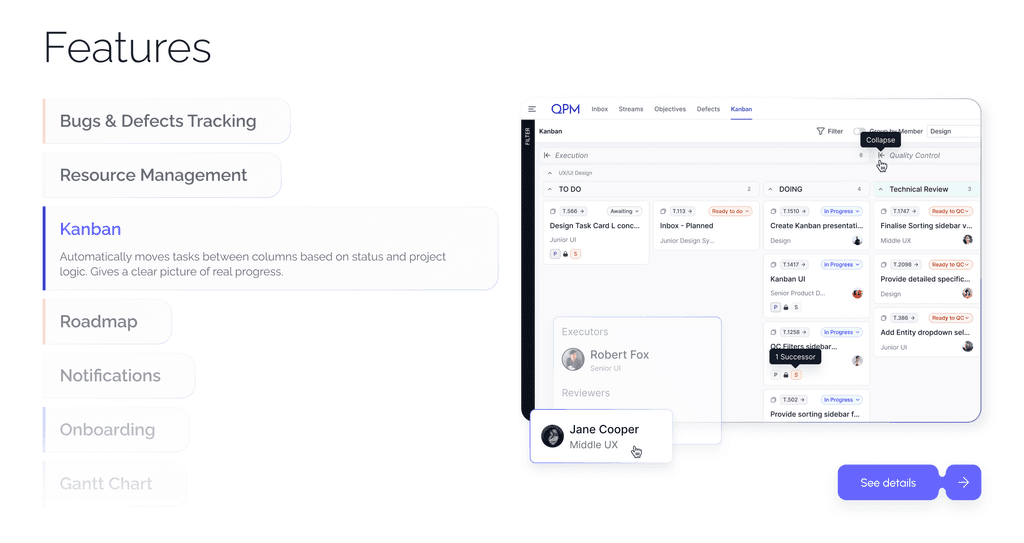
Automated Task Board
No manual random movements or errors.
All tasks move between stages automatically — based on workflow logic, roles, and review results.
The system itself determines when a task moves to the next stage, passes review, or is sent back for revision.



Who benefits from this feature

Project Managers
Ability to see the team’s real progress without manual control and constant status updates.

Team Leads
Transparent display of team workload, detection of blockages and delays in real time.

Executors
Clear work structure: tasks automatically appear in the appropriate statuses, without confusion or duplication.

Reviewers
Clear sequence of checks and automatic movement of tasks through quality control stages.

Managers and Analysts
Real-time updated view of the project — from individual tasks to strategic goals.
Developers & Technical Teams
Effortlessly identify when changes occurred in any task or workflow to simplify handovers and resolve issues faster.
Key features
Tasks move between stages without manual intervention — the system takes dependencies, roles, and review results into account.
Learn more about QPM

The system records all dependencies.
Why Use Task Board

No Manual Management — No Errors

Transparency for Team

Clarity in Workflow

Quality Control at Every Level

Full Progress Analytics
Learn more about QPM